
D666 Game Deposit & Withdraw Guide
Welcome to the D666 Game Deposit & Withdraw page. This guide explains how users can add funds to their accounts and request withdrawals quickly and securely.
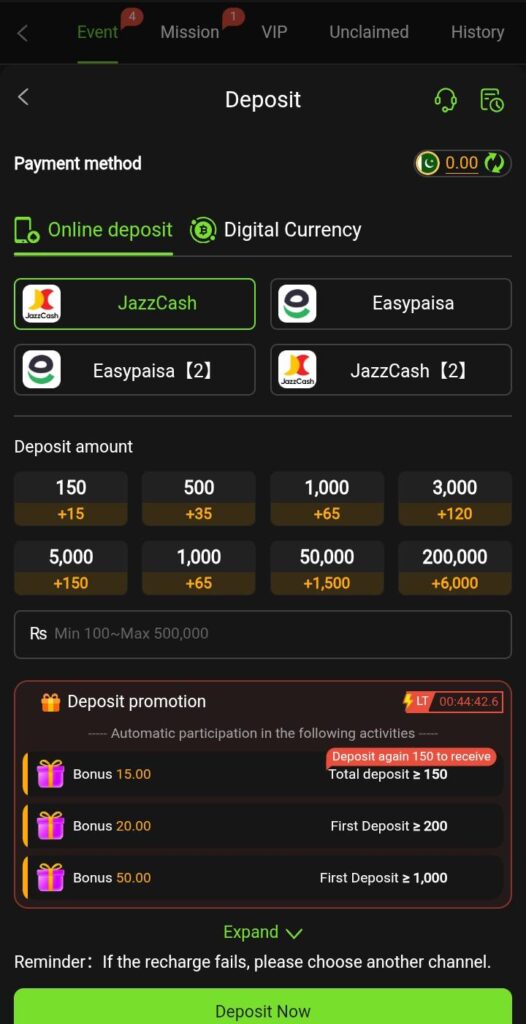
Deposit Money on D666 Game
Adding funds to your account is a simple process. After logging in, you can choose from the available payment methods and complete your transaction within minutes.
How to Deposit
- Log in to your D666 Game account.
- Open the Wallet or Deposit section.
- Select your preferred payment method.
- Enter the amount you wish to deposit.
- Follow the payment instructions provided.
- Confirm the transaction.
- Wait for the funds to appear in your account balance.
Available Deposit Options
- JazzCash
- Easypaisa
- Bank Transfer
- Mobile Banking
- Other supported payment methods available within the app
Withdraw Money from D666 Game
Users can request withdrawals directly from their account dashboard. Make sure your payment details are entered correctly before submitting a withdrawal request.
How to Withdraw
- Log in to your D666 Game account.
- Navigate to the Withdraw section.
- Select your preferred withdrawal method.
- Enter the withdrawal amount.
- Provide the required account details.
- Submit your request.
- Wait for the transaction to be processed.
Available Withdrawal Options
- JazzCash
- Easypaisa
- Bank Account Transfer
- Mobile Banking Services
Important Guidelines
- Ensure your account information is accurate.
- Double-check payment details before confirming transactions.
- Use only payment accounts registered in your name where required.
- Keep transaction records for future reference.
- Follow all platform rules regarding deposits and withdrawals.
Common Transaction Issues
Deposit Not Received
Check whether the payment was completed successfully and contact customer support if the balance is not updated after a reasonable period.
Withdrawal Pending
Withdrawal requests may require additional processing time depending on the selected payment method and verification requirements.
Incorrect Payment Information
If incorrect account details are entered, the transaction may fail or be delayed.
Safety Tips
- Never share your account password.
- Verify payment details before submitting requests.
- Use secure internet connections when making transactions.
- Contact official support for assistance with account-related issues.
Quick and Convenient Transactions
D666 Game provides a straightforward system for managing deposits and withdrawals, allowing users to handle account transactions directly through the platform.